Process Definition - Shared Tasks
 You can share tasks across different processes and phases. When you mark a task (field) as shared -> Share Across Processes and Phases, it can be used in multiple activities, which can be in different phases or even processes. Shared fields appear in the field list on the Shared tab.

When defining an activity, you can select tasks from three different tabs:
New - Create a new task: Select the field type to use.
Shared - Reuse a shared task. For better understanding, the list displays in which processes and phases the task has been added to an activity (Process > Phase > Activity).
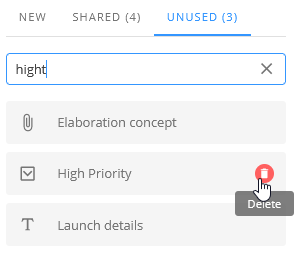
Unused - Select a task that has been defined before but currently is no used in any activity. The list displays both global and non-global fields. When you remove a field from an activity  , the field will appear on the Unused tab -> Message: This field can be restored from the list of unused fields.
 Open a process definition and open a phase. Click an activity and have a look at the fields (task) definition area at the right.
In the lists of shared fields and of unused fields you can filter for field names.
In the list of unused fields, you can now delete fields. When you delete an unused field, any project data that had been entered when the field was in use, will be deleted as well.